What AI Looks Like Inside an Invoicing Application
Torsten Uhlmann
—
Tue, 26 May 2026
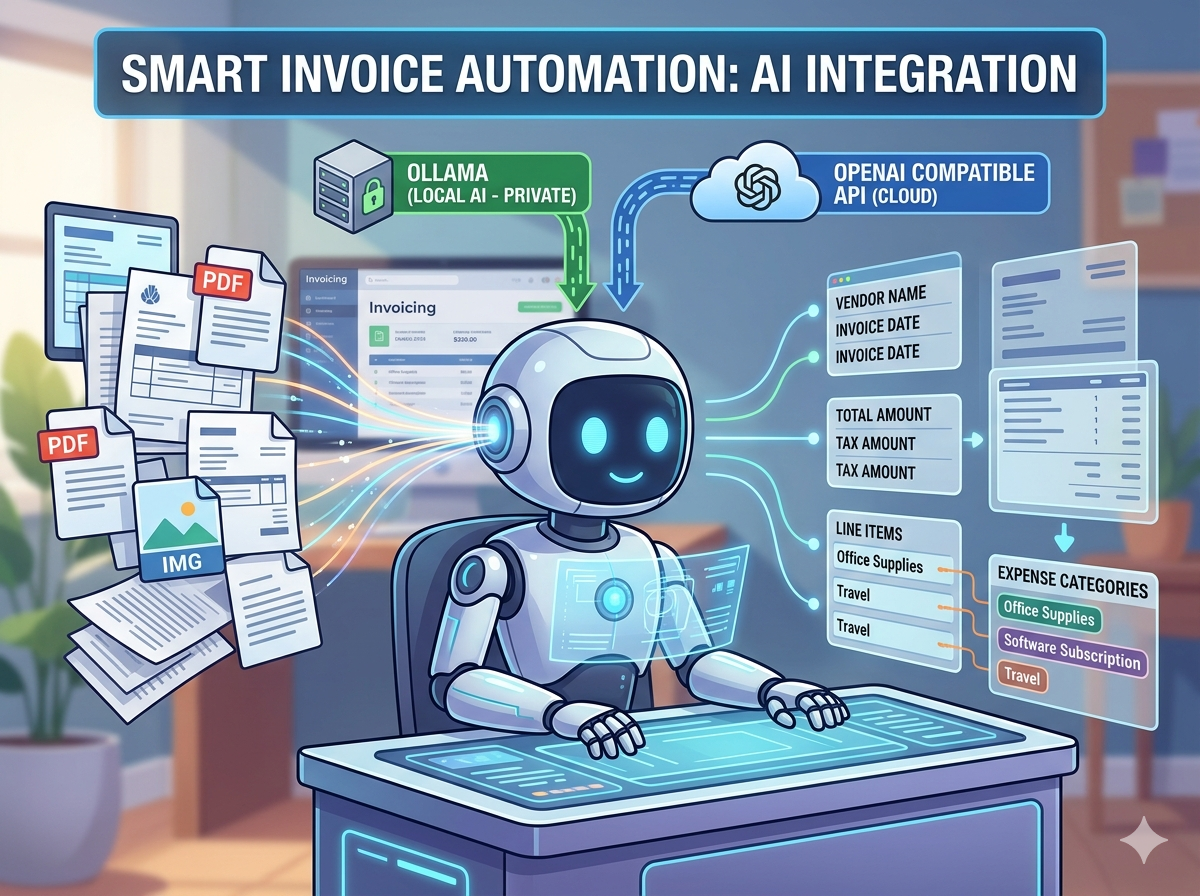
Image created with Gemini
I develop AGYNAMIX Invoicer, a cross-platform invoicing application for freelancers and small businesses. It is currently in pre release. Download for free and check it out.
Most conversations about AI in software still drift toward chatbots. That is understandable. Chat is easy to demo, easy to understand, and easy to turn into a screenshot with a friendly robot saying something suspiciously enthusiastic.
But the more interesting question is what AI looks like when it becomes part of an actual workflow.
In AGYNAMIX Invoicer, I recently integrated Ollama and OpenAI-compatible providers into incoming document processing. The goal is not to make the application chatty. Invoicing software does not need small talk. It needs to read a supplier invoice, extract useful metadata, suggest an expense category, and then get out of the way.
That is the kind of AI integration I find much more useful: quiet, specific, and attached to a real task.
The tedious part of incoming invoices
Uploading an incoming invoice is only the beginning. Before the document is useful, a user usually needs to capture or verify details such as:
- supplier name and address
- invoice number
- invoice date and due date
- net amount, VAT amount, and gross amount
- currency
- payment hints, such as whether the invoice was already paid or will be collected by direct debit
- the expense category that later helps with accounting and tax export
None of that is glamorous work. It is the kind of repetitive data entry that slowly convinces otherwise reasonable people to develop strong opinions about PDF layouts.
AGYNAMIX Invoicer already stores incoming documents in a revision-safe archive. The AI-assisted part reduces the manual work needed after the file has been added. Instead of asking the user to read every document field by field, the application can analyze the document, prepare structured metadata, and suggest a likely expense category.
The user still reviews the result. That part matters. AI can be helpful, but it should not be treated as a tiny tax clerk living inside your laptop.
Local models first, compatible providers when needed
The integration supports two provider styles:
- Ollama native, for local models running on your own machine or infrastructure
- OpenAI-compatible endpoints, for hosted or self-hosted providers that expose a compatible chat API
This gives the user a practical choice.
If privacy is the main concern, a local Ollama or LM Studio setup can keep document contents local. The invoice is analyzed by a model running under the user’s control, instead of being sent to a commercial AI provider. That is a meaningful option for business documents, where even a boring utility bill may contain more information than you want to casually donate to the internet.
At the same time, the application does not force one provider philosophy. If a user wants to use a hosted OpenAI-compatible service because it has a stronger model, better vision capabilities, or simply works better for their setup, the same workflow can use that endpoint instead.
The important point is that the provider is selected explicitly. Incoming document contents are sent to the selected AI provider for analysis, so the privacy model follows that choice.
What happens when a document is analyzed
The workflow is deliberately narrow.
For normal PDFs, the application first tries to extract text from the document. Text-based PDFs are usually the easiest case: the invoice already contains machine-readable text, even if the visual layout is still a creative act of supplier expression.
For scanned PDFs, the situation is different. PDF text extraction may return little or nothing because the pages are really images. In that case, a vision-capable model can be used. The application renders the PDF pages as images and sends those page images to the selected model for analysis.
Email intake is handled as text as well. For EML messages, the application can analyze the email body and message metadata, while keeping the scope clear: it should not pretend to have read attachments unless those attachments are selected and analyzed separately.
So the current shape is:
- PDFs with extractable text: analyze the extracted text
- scanned PDFs: analyze rendered page images with a vision-capable model
- EML/email text: analyze the email content and message metadata
That is a fairly typical example of useful AI architecture. The model is not asked to understand the whole application. It receives a bounded task, a bounded input, and a very specific output format.
Why the result is JSON, not prose
A chatbot can answer in prose. An invoicing application needs data.
That distinction changes the whole integration. The model is asked to return JSON with known fields, confidence values, and alternatives. The application can then parse that result, map it into its own document model, and show it to the user for review.
A shortened version of the metadata request looks like this:
Extract structured invoice metadata from this incoming document.
Return only valid JSON.
If a field is unknown, return null.
Use ISO dates for parsed dates.
Use integer cents for parsed amounts.
Do not confuse invoice number with order number, customer number, or payment reference.
If multiple plausible candidates exist, return the best value and up to three alternatives.
The response shape is intentionally boring, which is exactly what you want here:
{
  "invoiceNumber": {
    "value": "RE-2026-1042",
    "confidence": 0.91,
    "alternatives": []
  },
  "invoiceDate": {
    "value": "26.05.2026",
    "parsedDate": "2026-05-26",
    "confidence": 0.88,
    "alternatives": []
  },
  "grossAmount": {
    "value": "119.00 EUR",
    "parsedAmountCents": 11900,
    "confidence": 0.94,
    "alternatives": []
  },
  "supplierName": {
    "value": "Example Supplier GmbH",
    "confidence": 0.86,
    "alternatives": []
  },
  "overallConfidence": 0.89
}
The real structure contains more fields, including supplier address details, VAT information, currency, bank details, and payment evidence. But the principle is simple: the model proposes structured data, and the application decides how to apply it.
This also makes the workflow more transparent. If the model is unsure, the user can see that uncertainty instead of receiving a suspiciously confident sentence that sounds like it recently bought a blazer.
Expense categories are suggested from the user’s own list
Metadata extraction is only half the story. For bookkeeping, the expense category is often just as important.
The category suggestion prompt follows a stricter rule: the AI must choose only from the expense categories already available in the application. It must not invent a new category, a new ID, or a new accounting code. Creativity is wonderful in many places. Accounting is not one of them.
A shortened version of that request looks like this:
Suggest expense category candidates for this incoming invoice.
Choose only from the provided expense categories.
Prefer categories that match the line-item goods and services.
Supplier identity may help, but line-item content is more important.
Return one primary suggestion and up to three alternatives.
Include a concise reason for every returned candidate.
Return null if none of the provided categories clearly fits.
The response can contain a primary suggestion plus alternatives:
{
  "expenseCategorySuggestionResult": {
    "primary": {
      "categoryId": "office-supplies",
      "categoryCode": "4930",
      "confidence": 0.82,
      "reason": "The line items describe printer paper and office materials."
    },
    "alternatives": [
      {
        "categoryId": "it-consumables",
        "categoryCode": "4900",
        "confidence": 0.47,
        "reason": "Some items could be interpreted as computer accessories."
      }
    ]
  }
}
The alternatives are important. Real invoices are not always clean. A supplier may sell office supplies, hardware, software subscriptions, coffee, and one mysterious adapter cable that nobody remembers ordering. A single invoice can plausibly match more than one category.
Returning alternatives lets the application show uncertainty instead of hiding it.
The useful pattern: AI as a reviewer-facing assistant
The pattern I like here is not automation at all costs. It is assisted preparation.
The application can do the first pass:
- read the incoming document,
- extract likely metadata,
- suggest an expense category,
- preserve confidence and alternatives,
- let the user review and apply the result.
That removes a significant amount of manual work without pretending that the user has disappeared from the process. In business software, that distinction is critical.
The user is still responsible for the final document data. The AI just reduces the amount of staring at invoices, which is generally a public good.
Why this matters for tax accountant exports
The real payoff comes later.
When incoming documents are stored in a revision-safe archive and their metadata is clean, the application can prepare a much better export for tax accountants. The document is no longer just a file with a name. It has dates, amounts, supplier information, payment hints, and an expense category that can be used downstream.
That means fewer manual corrections later and a smoother path from incoming document to bookkeeping handoff.
This is where AI becomes practical. Not because it writes a charming paragraph about invoices, but because it helps turn unstructured documents into reviewable, structured business data.
What I learned from building it
The main lesson is that useful AI integration is mostly about boundaries.
The model should not receive a vague instruction like “understand this invoice.” It should receive a specific task, a clear schema, a list of allowed categories, and rules for uncertainty.
The application around the model matters just as much as the model itself:
- text extraction should be used when possible
- vision should be used when the PDF is scanned
- provider choice should be explicit
- local-only processing should be possible
- JSON should be validated before it enters the workflow
- alternatives and confidence should be preserved for review
That is less glamorous than a chatbot demo, but much closer to how AI can improve real applications.
And frankly, if the best AI feature in an invoicing application is that the user has to type less invoice metadata, I will take that over a cheerful assistant explaining EBITDA with jazz hands.
I develop AGYNAMIX Invoicer, a cross-platform invoicing application for freelancers and small businesses. It supports local-first workflows, structured invoicing, incoming document handling, and practical automation without forcing every business document through a cloud service. Download for free and check it out.